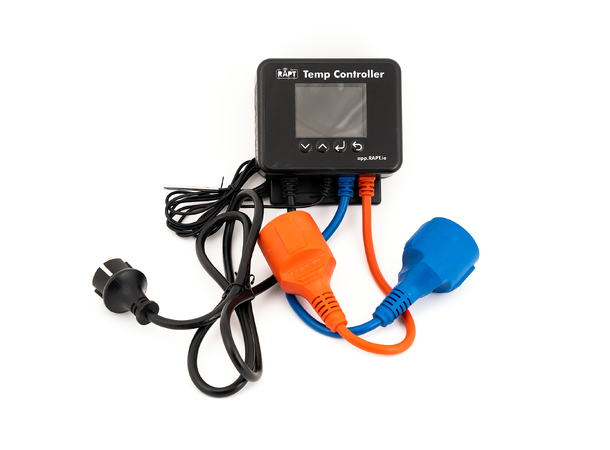
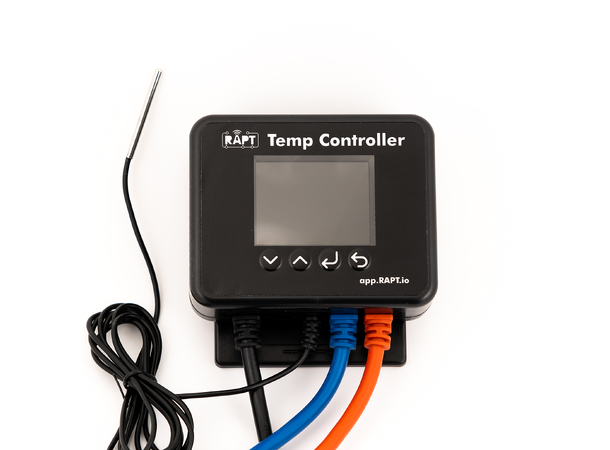
Thermostat with WiFi, color screen and outlets for both cooling and heating. Compatible with KegLand's RAPT portal.
The RAPT Temperature Controller can control both a heat source and a cooling unit to maintain a consistent fermentation temperature. You can also program your own fermentation schedules and both monitor and control the temperature remotely thanks to the WiFi function. The temperature can be presented over time as a graph both on the device's screen and via the RAPT portal.
This thermostat is part of the series of RAPT products developed by KegLand where the idea is that all your equipment should be able to be connected together via Bluetooth or WiFi. Once connected, you can follow your beer from kettle to fermenter and save all information for future analysis. You can also use more precise data from several different RAPT sources to control, for example, the temperature.
Perhaps the most powerful combination for this unit is to sync with a RAPT Pill digital hydrometer that measures temperature and density inside the fermenter. The RAPT Temperature Controller can then use the internal temperature to regulate cooling and heating as well as display density and temperature on the same graph.
The thermostat can be mounted on the wall or as a stand-alone unit (see the manual for all options).
The device has several settings such as: Adjustable rest pause, to prevent overloading of the refrigerator compressor Separately adjustable hysteresis for cooling or heat Temperature warning at temperature outside certain range PID algorithm for smoother heating with stronger heat sources
The clearly marked connections for cooling and heating can each handle up to 10 A (2400 watts). Has a calibratable temperature probe (diameter 4 mm) with a 2 m long cord.
Measuring range -20 °C to +120 °C Only works with 2.4GHz WiFi
In stock: 4
Fast delivery
International shipping
E-mail us, we reply swiftly!
BrandKegLand
Description
Article no.: 814516
Thermostat with WiFi, color screen and outlets for both cooling and heating. Compatible with KegLand's RAPT portal.
The RAPT Temperature Controller can control both a heat source and a cooling unit to maintain a consistent fermentation temperature. You can also program your own fermentation schedules and both monitor and control the temperature remotely thanks to the WiFi function. The temperature can be presented over time as a graph both on the device's screen and via the RAPT portal.
This thermostat is part of the series of RAPT products developed by KegLand where the idea is that all your equipment should be able to be connected together via Bluetooth or WiFi. Once connected, you can follow your beer from kettle to fermenter and save all information for future analysis. You can also use more precise data from several different RAPT sources to control, for example, the temperature.
Perhaps the most powerful combination for this unit is to sync with a RAPT Pill digital hydrometer that measures temperature and density inside the fermenter. The RAPT Temperature Controller can then use the internal temperature to regulate cooling and heating as well as display density and temperature on the same graph.
The thermostat can be mounted on the wall or as a stand-alone unit (see the manual for all options).
The device has several settings such as: Adjustable rest pause, to prevent overloading of the refrigerator compressor Separately adjustable hysteresis for cooling or heat Temperature warning at temperature outside certain range PID algorithm for smoother heating with stronger heat sources
The clearly marked connections for cooling and heating can each handle up to 10 A (2400 watts). Has a calibratable temperature probe (diameter 4 mm) with a 2 m long cord.
Measuring range -20 °C to +120 °C Only works with 2.4GHz WiFi
Ansluta RAPT Pill till RAPT Temperature Controller
Hej
Jag har en RAPT Pill och en RAPT Temperature Controller.
Tanken är att koppla samman dessa för att låta PILL ge data till Controlern för att styra temperaturen hos jäskärlet.
De verkar fungera var för sig och båda är registrerade hos RAPT CLOUD.
På instruktionsvideon här ovan så säger de att man skall starta Bluetoothen på conrolern för att få kontakt med Pill.
Men det finns inte det valet på min controler.
Hur gör jag då för att para de två enheterna med varandra?
✓
Alexander, Marknad
Hej
Du måste aktivera Bluetooth i "settings" på din Temperatur Controller. Du hittar hur du gör det på sida 14 i manualen som du hittar längst ned på produktsidan.